
Search This Blog

Showing posts with label calendar. Show all posts

Friday, June 17, 2016

How to solve Thunderbird Lightning calendar appointments showing as overlapping

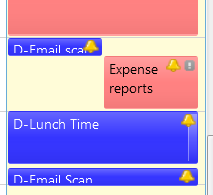
Have you added a 15min appointment next to another one and see those as overlaping appointments on Thunderbird Ligntning calendar? Something like this:

This has been something I could not fix for quite a while until I finally found this article answered by user called "Decathlon" (THANK YOU Decathlon!)

In summary, if you play with zooming factor (CTRL +/-) you may be able to correct that but it had to do with font size, height of events, number of hours displayed etc. That article suggests the following: 

To avoid the problem you have to increase the zoom factor, or you can add some css code in the userChrome.css file in order to reduce the minimum height of the boxes. Without changing the font size, you can try something like:
.calendar-event-box-container {
    margin: 0px !important;
}
but obviously the problem arises again if the zoom factor is too little.
I decided just to change zoom with CTRL + and got this: 

Friday, August 10, 2012

Doing TO DOs with Toodledo on Thunderbird (+Lighting ?)

How I integrated my preferred Mail, Calendar and Todos tools.

I use Thunderbird as my email client and Lightning for integration with my company calendar and other personal calendars as needed but was missing a connection with for my TO DOs since I like using Toodledo (toodledo.com). To me Toodledo is the best free ToDo (GTD - Get Things Done) personal management tool out there. I tried the to use the Lightning extension to connect directly to Toodledo by following some simple instructions but for some reason it did not work. So at the end, I used another Thunderbird Extension (WAT:WebApplicationTab ) and simply opened Toodledo as a web page on Thunderbird. It works really well! Look!

To integrate Lightning to Toodledo you may try doing this:
on Toodledo
1) log in
2) In "Tools & Services" click in calendars "Configure"
3) Enable Calendar Suscriptions
4) Use the links offered as urls to be used in Lightinig


Now, on Lightining
1) Create a new calendar (right click on calendar area)
2) Select On Network


 3) Seletct ICS calendar and use the Toodledo url as location


4) Give it a name (and cross your fingers)


In my case , this did not work but the reason could be I am inside a company firewall. Good luck for you!

Labels

problems (8) windows 10 (7) Windows 7 (6) thunderbird (5) iPhone (3) Excel (2) MacOS (2) calendar (2) chrome (2) lightning (2) mac os (2) problem (2) tips (2) Apple on windows (1) Bluetooth (1) Costco (1) Disk Incentory X (1) Excel tips (1) GrandPerspective (1) MS Office (1) Mac (1) MacMini (1) Magic trackpad (1) Microsoft Compatibility Telemetry (1) N900 (1) Netgear (1) Office 2007 (1) OneNote (1) TWS (1) ThunderBrowse (1) Timezone (1) Trello on Thunderbird (1) Ventura (1) WNDR4500 (1) Web (1) WebPG (1) Window Maximize (1) Windows XP (1) adobe (1) associations (1) auto-complete (1) autocomplete (1) cell color (1) changes (1) conditional format (1) consolidation (1) create text file (1) day of the week (1) disabled (1) dish (1) dish network (1) disk (1) embedded document (1) excell (1) extension (1) file utilities (1) finger (1) fingerprint (1) firefox (1) folder consolidation (1) font (1) font size (1) forgot password (1) google sheets (1) high cpu usage (1) i7-TWS (1) iOS 10 (1) iPhone 5 (1) iPhone device (1) issue (1) itunes (1) japanese (1) java (1) keyboard (1) language (1) lock screen (1) log in problems (1) login problems (1) lower bill (1) magic mouse (1) mail (1) maximize (1) media server (1) mouse drifting (1) mouse problems (1) new file (1) new text file (1) pdf (1) picture management (1) pictures (1) pivot table (1) portege z30-a (1) reading japanese (1) recovery (1) reduce (1) reference same cell (1) rename device (1) rikai (1) search (1) security (1) snipping (1) snipping tool (1) spotlight (1) telemetry (1) text file on mac (1) time (1) todo (1) toshiba (1) treemaps (1) unique values (1) update (1) utilities (1) weekday format (1) word (1) worksheets (1)